 Mailnatives
  2026-04-09 09:42:45
  2 min reading
Uploading files directly in the form
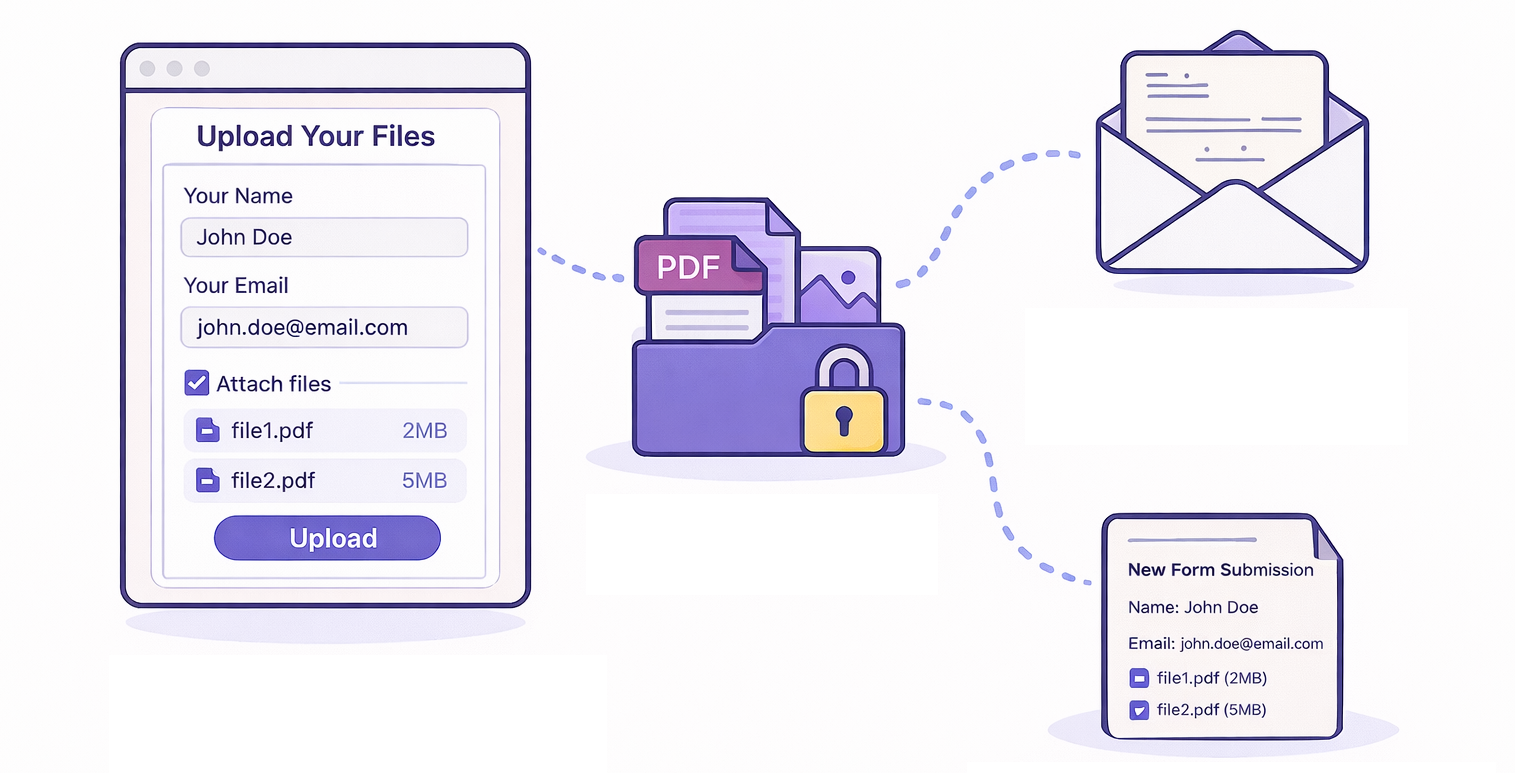
Mailocator allows you to enhance a standard form with file upload functionality. Users can easily attach one or more files, which are then not sent as traditional email attachments but delivered via a secure link. This allows recipients to download the file with a single click.
Furthermore, the entire process can be easily automated, and the form can be integrated with a CRM or other systems where the data is further processed.
Why and where to use this feature
The ability to attach files significantly expands the use of standard forms. It is suitable, for example, for:
- Applications
- Complaints
- Data collection
- Surveys or registrations
A major advantage is that you can work comfortably and securely even with larger files – typically ranging from tens to hundreds of MB. Files are not sent as attachments but only as links, which saves on email infrastructure and eliminates deliverability issues.
Case Study: How We Use Form Uploads at Mailocator
We actively use this feature internally at Mailocator as well – for example, when handling custom campaigns. Clients can simply send us their briefs, including graphic assets, directly via the form, which is connected to the production team’s internal system.
This has significantly sped up the entire process.
We no longer have to search for attachments in emails or laboriously match briefs with materials – everything is automatically transferred to our internal system and is immediately ready for processing.
At the same time, we’ve eliminated the issues associated with external file-sharing tools.
There’s no longer a need to manage access permissions, wait for documents to be shared with specific users, or worry about archiving. Files are available exactly where they need to be, right when they’re needed – without any unnecessary extra steps.
Key Features and Security
After submitting the form, a message containing the form’s content and links to the uploaded files is sent to the specified email address. The name, format, and size of each file are visible, giving you an immediate overview.
Files are securely stored in the Mailocator repository for 7 days, after which they are automatically deleted. Additionally, you can define the following in the settings:
allowed file formats
maximum size
option to delete the file immediately after the first download
This last option is crucial for situations where maximum privacy protection and control over the number of data accesses are required.
Automation and System Integration
The sent message can also include a files.json file containing a structured list of uploaded files. This allows data to be easily and automatically transferred to internal systems, CRMs, or other enterprise solutions.
This is an efficient way to handle scenarios that would otherwise require a custom backend, complex infrastructure, and additional costs. Mailocator thus offers a simple yet enterprise-ready solution for working with files in forms.